


System requirements for E-Prime and Net Station
| Net Station | E-Prime Software | E-Prime Extension for
Net Station (EENS) |
Windows OS |
| 5.5 | 3.0.3.80 | 3.0.1.22 | Windows 11 |
| 5.4.2 | 3.0.3.80 or 2.0.10.356 | 3.0.1.22 or 2.0.2.26 | Windows 10 (E-prime 3) or Windows 10 (E-Prime 2) |
| 5.4.x | 2.0.10.356 or 3.0 | 2.0.2.26 or 3.0 | Windows 10 (E-Prime 2 only)
– or – Windows 7 SP2, Windows 8, or Windows 10 (E-Prime 3 only) |
| 5.3 | 2.0.10.356 | 2.0.2.26 | Windows 7 |
| 5.2 | 2.0.10.356 | 2.0.2.26 | Windows 7 |
| 5.0 – 5.1.2 | 2.0.10.353 | 2.0.2.26 | Windows 7 |
| 4.5.7 | 2.0.10.353 | 2.0.2.26 | Windows 7 |
| 4.4.2 – 4.5.4 | 2.0.8.74 or 2.0.8.90 | 2.0.0.88 or 2.0.1.10 | Windows XP only |
Magstim EGI highly recommends at least 8GB RAM on the Windows machine for optimal performance of your E-Prime system. It is recommended to purchase a new computer from Magstim EGI rather than upgrading the operating system of your existing ones because we cannot support Windows OS updates. If your existing E-Prime machine is running Windows XP, please contact the Support Team for further advice.

Psychological Software Tools (PST) offers other extensions for integration of eye-tracking (SR Research & Tobii) with E-Prime and Net Station. For pricing and more information about these extensions, contact the Magstim EGI sales team. For technical support related to use and set up of E-Prime extensions other than EENS, please contact PST directly.
Only E-Prime 3.0 is compatible with Geodesic Transcranial Electrical Neuromodulation (GTEN) systems for neuromodulation controls with E-Prime.
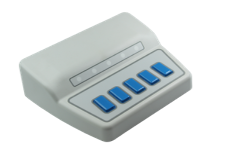
The Chronos device for E-Prime synchronized responses, sound output, and device communication is compatible with E-Prime 2.0 and 3.0 versions. If the use of the EGI response pad is preferred, a Chronos adapter is required.
To get started using E-Prime with your Magstim EGI HD EEG Geodesic EEG system, the following Knowledge Center articles can help.